Prove your controls actually run.
Auditors and insurers don't just ask whether you have a policy. They ask for the access review sign-offs, the restore test results and the vendor list. These 10 Excel trackers produce that evidence and flag what's overdue.
The 10 trackers
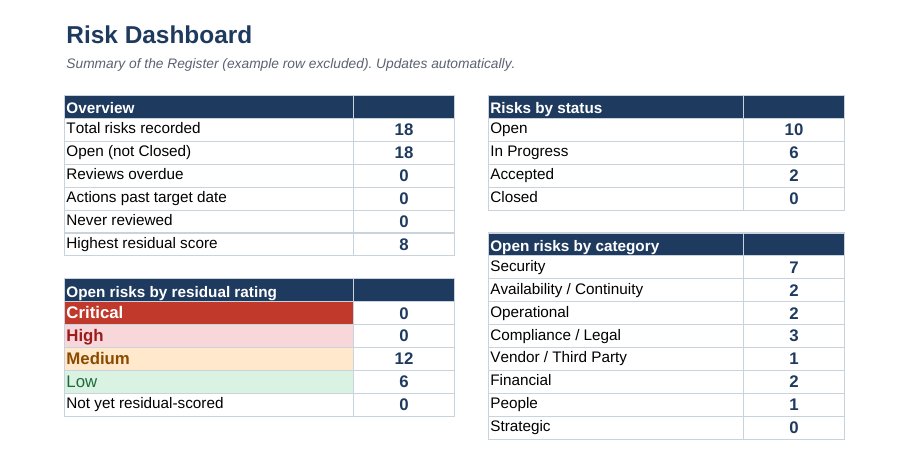
Every workbook has a How to Use tab, yellow input cells, dropdowns, a red/amber/green flag column, and a dashboard that updates itself. Each one cites the policy section and SOC 2 criteria it supports.
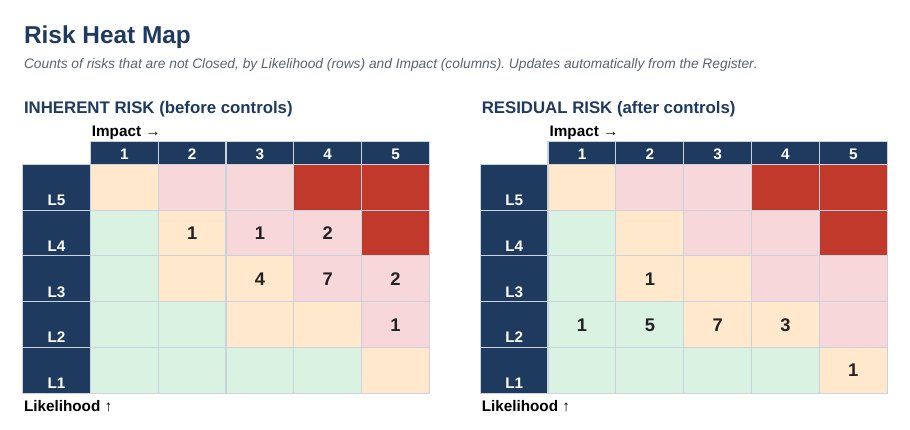
- IT Risk Register: Likelihood × impact scoring, inherent and residual risk, a 5×5 heat map, and a starter library of 18 common IT risks
- Asset & SaaS Inventory: Device baseline compliance, replacement dates, SaaS spend, unused seats, cancel-by dates
- Access Review Log: Quarterly and annual review schedule, account-level decisions, remediation due dates
- Joiner / Mover / Leaver Log: 8-step checklist, policy-driven due dates, on-time rate for leavers
- Incident Log: Severity, timeline, escalation timing, post-incident reviews and actions
- Change Log: Flags self-approval, changes made before approval, missing rollback plans; standard change catalog
- Backup & Restore Test Log: 3-2-1-1-0 check per system, restore tests scored against RTO and RPO, failure log
- Vendor Risk Register: Automatic tiering, stale SOC 2 reports, missing DPAs, offboarding checks
- Training & Phishing Tracker: Per-person due dates, campaign rates vs targets, repeat clickers
- IT Budget & Roadmap: Quarterly actuals vs budget with pace flags, and an 8-quarter roadmap tied to risks
A look inside
Questions, answered
Who is this for?
IT managers, first IT hires and operations leaders at companies with roughly 20-300 employees who need professional IT policies and records without hiring a consultant. MSPs can use it too. See the license for multi-client use.
What format are the files?
Policies are Microsoft Word (.docx) and open in Google Docs. Trackers and the calendar are Excel (.xlsx), built for Excel 2019 or later and Microsoft 365, and most features also work in Google Sheets. Downloads are delivered as ZIP files.
How long does customization take?
Most buyers finish the 12 policies in 4-8 hours using the Start Here guide. Every item you need to change is a yellow-highlighted placeholder in [brackets], so nothing gets missed.
Will this make us SOC 2 compliant or guarantee our insurance renewal?
No template can do that on its own. SOC 2 needs written policies and evidence that you follow them over time, and insurers decide their own underwriting. This toolkit gives you both pieces and maps each one to the criteria and questions it supports, so you can answer confidently.
Is this legal advice?
No. These are professional templates written from real IT operations experience. Have counsel review the sections the guide flags (retention periods, breach notification, monitoring language), especially in regulated industries.
How do I receive the files?
Right after checkout we email download links (valid for 7 days). Lost the email? Request fresh links any time on the Downloads page.
Do I get updates?
Yes. Buyers receive free updates to version 1.x of the products they purchased.
What if it isn't right for us?
Email us within 30 days of purchase for a full refund. No forms, no hassle.
Microsoft 365 Security Baseline Checklist
35 settings that close the gaps attackers, auditors and cyber insurers look for first, each with why it matters and exactly where to change it. Start with the 7 marked Critical.
Free. We'll also send occasional practical IT ops tips. Unsubscribe any time.