Pass the insurance application and the security questionnaire.
Ready-to-customize IT policies and evidence trackers for companies with 20-300 employees, mapped to SOC 2 and the questions cyber insurers actually ask. Written by a working IT operations leader.
You run IT. Now everyone wants it in writing.
The cyber insurance renewal
"Do you have a written incident response plan? Are backups immutable and tested? Is MFA enforced for admins?" One wrong answer can cost you coverage, or a claim.
The customer security questionnaire
Your biggest prospect sends 200 questions and wants your policies attached. Sales needs it by Friday.
"Are we SOC 2 ready?"
Leadership asks. A consultant quotes thousands just to write the policies, before anyone collects the evidence.
Policies say what you do. Trackers prove you do it.
Most template packs stop at documents. Auditors and insurers ask for both, so every tracker points to the exact policy section it supports.
Customize the policies
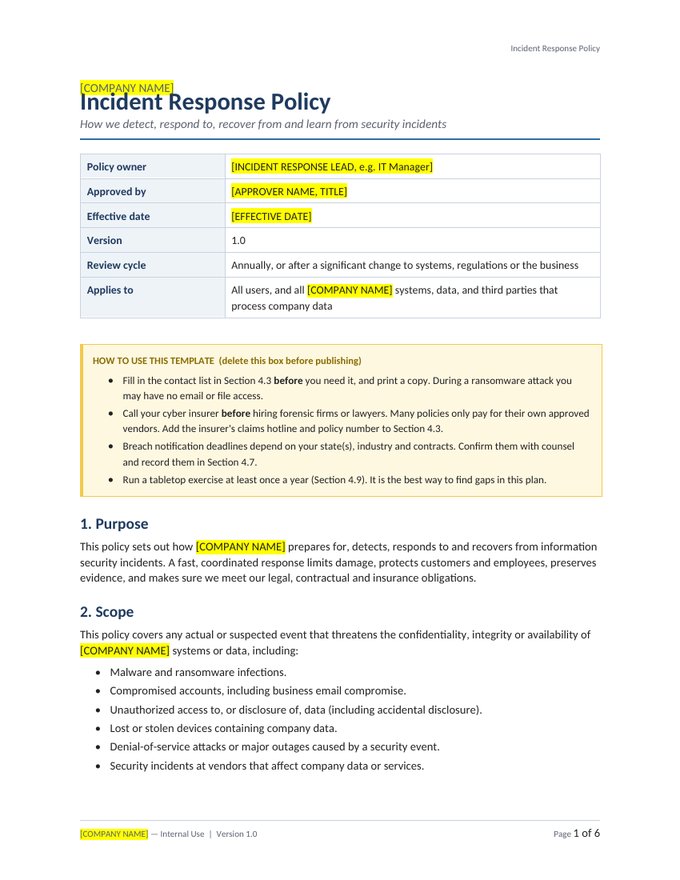
Follow the Start Here guide: replace the highlighted placeholders, make 12 key decisions, and get approval. Most teams finish in a day.
Run the trackers
Log access reviews, incidents, changes, backup tests and vendors. Dashboards flag what's overdue in red, amber and green.
Answer with confidence
Use the framework mapping to point insurers, auditors and customers to the exact policy and the evidence behind it.
One-time purchase. No subscription.
Instant download, free 1.x updates, and a 30-day money-back guarantee.
IT Policy Pack
The written policies insurers, auditors and customers ask for.
- 12 editable Word policies
- Start Here customization guide
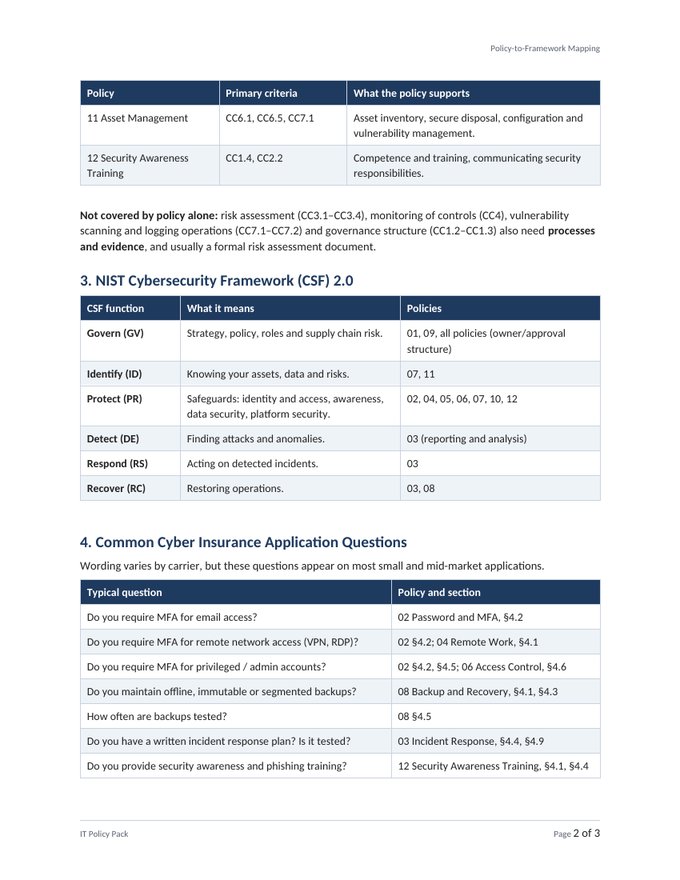
- SOC 2, NIST CSF and cyber insurance mapping
- Policy and compliance calendar (Excel)
- Employee acknowledgment form
Complete Bundle
Policies plus the trackers that prove you follow them.
- Everything in the IT Policy Pack
- Everything in the IT Evidence Kit
- Policies and trackers cross-referenced section by section
- Free updates to version 1.x
- 30-day money-back guarantee
IT Evidence Kit
The records that prove your controls actually run.
- 10 Excel trackers with live dashboards
- Risk register with heat map and 18 starter risks
- Access reviews, joiners/movers/leavers, incidents, changes
- Backup tests, vendor risk, training and phishing, budget
- Start Here guide
Built for the person who has to actually finish it
Mapped to the questions you'll be asked
A cross-reference shows which policy section answers each SOC 2 criterion, NIST CSF 2.0 function, and 13 common cyber insurance application questions.
Practical, current, plain English
Aligned with current guidance such as NIST's passphrase-and-MFA approach and the 3-2-1-1-0 backup rule. Employees will actually read these policies, and auditors will accept them.
Trackers that do the math
Real formulas, not empty grids: next-due dates, overdue flags, RTO/RPO checks, vendor tiering from your answers, and dashboards that update themselves.
Focused, not bloated
No 170-file dump of enterprise ITIL templates you'll never open. Just what a 20-300 person company needs, in the order you should do it.
Built by a 25-year IT operations leader
IT Ops in a Box was created by an IT executive with more than 25 years of experience leading IT, infrastructure, security and business systems at large multinational telecom providers. Most recently he served as Director of IT Operations at one of the nation's top-ranked cybersecurity firms, running IT operations, infrastructure, security, cloud and the service desk for more than 1,000 employees.
IT Ops in a Box packages what that experience has taught him into the policies and trackers a growing company actually needs. They're practical, current, and built around the questions insurers, auditors and customers really ask.
leading IT, infrastructure, security and business systems
employees supported at a top-ranked national cybersecurity firm
at large multinational telecom providers
Great fit
IT managers, first IT hires, ops leaders who inherited IT, and MSPs serving small and mid-size clients.
Not the right fit
Large enterprises with a dedicated GRC team, or anyone who needs policies certified by an auditor.
Questions, answered
Who is this for?
IT managers, first IT hires and operations leaders at companies with roughly 20-300 employees who need professional IT policies and records without hiring a consultant. MSPs can use it too. See the license for multi-client use.
What format are the files?
Policies are Microsoft Word (.docx) and open in Google Docs. Trackers and the calendar are Excel (.xlsx), built for Excel 2019 or later and Microsoft 365, and most features also work in Google Sheets. Downloads are delivered as ZIP files.
How long does customization take?
Most buyers finish the 12 policies in 4-8 hours using the Start Here guide. Every item you need to change is a yellow-highlighted placeholder in [brackets], so nothing gets missed.
Will this make us SOC 2 compliant or guarantee our insurance renewal?
No template can do that on its own. SOC 2 needs written policies and evidence that you follow them over time, and insurers decide their own underwriting. This toolkit gives you both pieces and maps each one to the criteria and questions it supports, so you can answer confidently.
Is this legal advice?
No. These are professional templates written from real IT operations experience. Have counsel review the sections the guide flags (retention periods, breach notification, monitoring language), especially in regulated industries.
How do I receive the files?
Right after checkout we email download links (valid for 7 days). Lost the email? Request fresh links any time on the Downloads page.
Do I get updates?
Yes. Buyers receive free updates to version 1.x of the products they purchased.
What if it isn't right for us?
Email us within 30 days of purchase for a full refund. No forms, no hassle.
Microsoft 365 Security Baseline Checklist
35 settings that close the gaps attackers, auditors and cyber insurers look for first, each with why it matters and exactly where to change it. Start with the 7 marked Critical.
Free. We'll also send occasional practical IT ops tips. Unsubscribe any time.